
Save the Dates Without Photos: Five Design Directions for Nikah and Walima
Choose a photo-free Save the Date with five clear design directions, original wording structures and a practical brief for your designer.
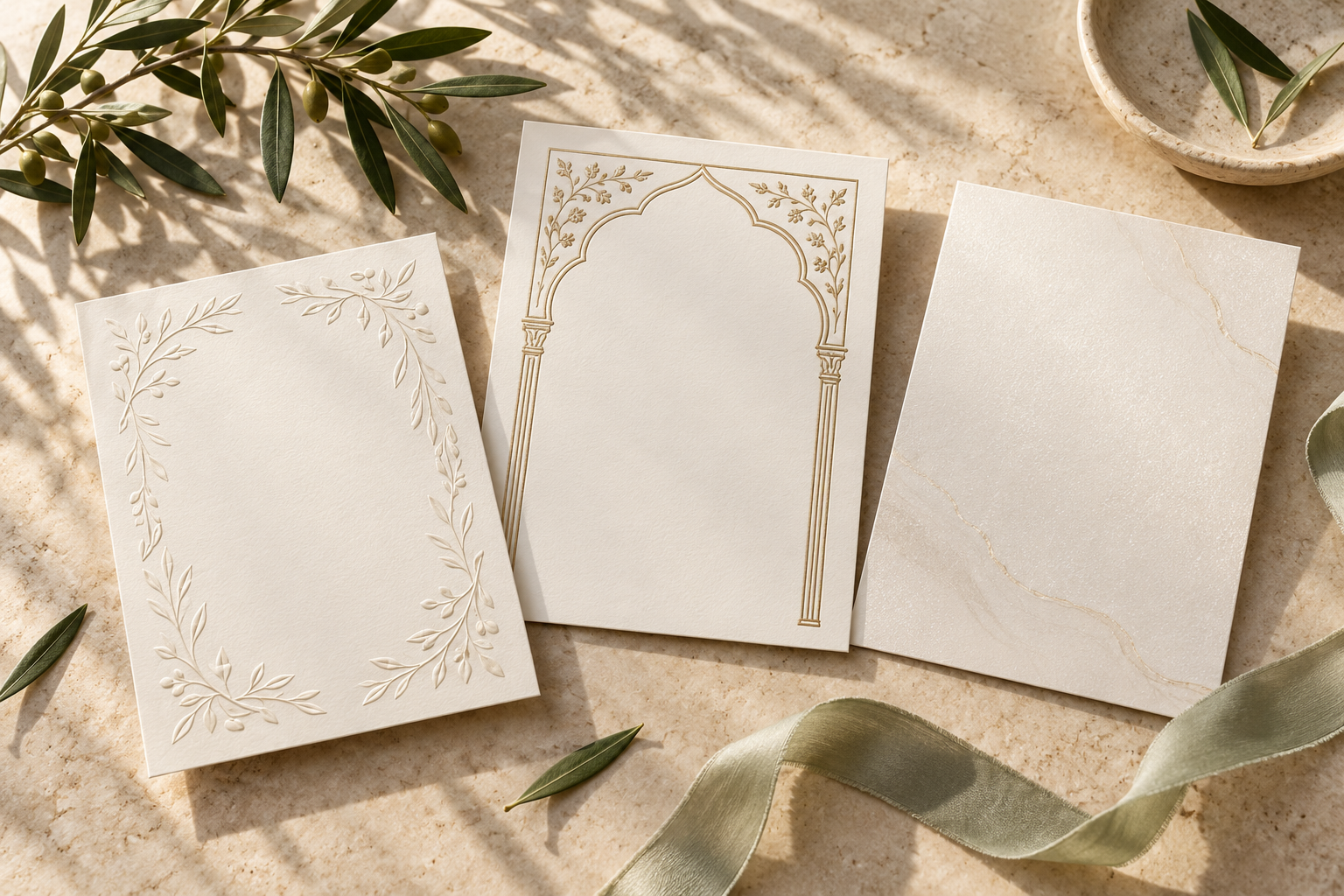
A Save the Date does not need a couple photograph to feel personal. For a Nikah or Walima, the names, confirmed date, chosen colours and a considered visual motif can carry the announcement beautifully. The useful question is not “What fills the missing photo?” It is “What should guests notice first?”
Start with the date and both names. Then choose one visual direction that supports them. This guide helps you decide between five photo-free approaches, brief a designer clearly and check the result on a phone—without treating a photoshoot as a requirement.
First decide what the announcement needs to do
A Save the Date is an early announcement, not the full invitation. Guests should be able to identify the couple, the celebration and the date they are being asked to keep free. Include a confirmed city when useful, and make it clear that the formal invitation will follow.
Removing a photograph does not mean adding every other wedding detail. A long itinerary, several host paragraphs and a decorative border can overwhelm the same space a portrait would have occupied. Keep practical details purposeful and save the rest for the invitation.
Before choosing a design, write these four lines on their own:
- The couple’s names, with approved spellings.
- The event or celebration being announced.
- The confirmed date, written with the month in words.
- The confirmed city and “Formal invitation to follow,” where appropriate.
If those lines are unclear, a more elaborate background will not solve the problem. For uncertain location details, use the separate Save the Date location wording guide before approving the artwork.
Five photo-free design directions—and when to choose each
The following are design approaches to discuss, not a promise that every template includes custom illustration or every modification. Check the scope of your chosen service before commissioning additional artwork.
1. Typography-led: let the names and date be the design
Choose this when you like a modern, restrained announcement or want very little decoration. A confident arrangement of names, spacing and one prominent date can feel complete without a central picture.
A useful starting brief is: “Make the date easy to find; give our names room; use one decorative type style only where it remains readable.” There is no need for every line to have the same visual weight. Names and date can lead, with the city and follow-up line quieter underneath.
Watch for: thin lettering, overly elaborate initials and all-capital paragraphs. Ask to see the actual names, not a short placeholder. A layout that suits two short names may need a different line break for longer ones.
2. Botanical: frame the information rather than covering it
Choose this when you want a soft, garden-like mood. A restrained floral or leaf border can make the card feel warm while leaving a calm centre for the announcement.
Ask for the foliage to support the reading area. Large flowers behind the date may look attractive at full size but make it harder to read in a chat. One controlled frame usually communicates the idea more clearly than several unrelated decorative clusters.
Watch for: busy corners pushing the names inward, pale text over pale petals and essential details sitting on top of a textured illustration. Ask for the background to be simplified before asking for smaller text.
3. Architectural: use an arch as a visual frame
Choose this when you want a formal, composed announcement. An illustrated arch or courtyard-inspired frame can organise the names and date without needing a portrait.
Be specific about the mood: light and airy, warm sandstone or more ceremonial. Do not assume that an architectural illustration depicts your booked venue. If it is decorative, keep it decorative; if you want an identifiable location, agree on the reference and illustration scope separately.
Watch for: towers or arches becoming the main event while the date disappears. The artwork should guide the eye toward the message, not compete with it. Religious wording or calligraphy should only be included if you want it and can arrange a careful language check.
4. Monogram-led: a personal mark with full names underneath
Choose this when you want a small personal detail that could appear again in later stationery. A simple initial pairing can act as an accent, while the full names make the announcement understandable to every family member.
Agree on the exact initials and their order before the design begins. If names will also appear in another script, decide separately how they should be written; a Latin-letter monogram is not a substitute for an approved translation or transliteration.
Watch for: an ornate symbol that guests cannot decipher. Keep the full names visible. Confirm whether monogram design and reuse files are included rather than assuming an announcement purchase provides a separate brand-asset package.
5. Texture-and-colour-led: quiet detail, clear contrast
Choose this when you prefer a minimal design that still has depth. An ivory surface, restrained shimmer or gentle colour field can create atmosphere without adding a photograph or a dense illustration.
For a digital announcement, texture is a visual effect, not a promise of physical foil or embossed paper. Ask whether it still looks clean on a normal phone and whether the lettering has enough contrast against every part of the background.
Watch for: pale gold lettering disappearing into a cream surface or excessive shimmer around the date. The quietest version may be the most effective. You can keep the celebration’s colour palette without making every essential line the accent colour.
A quick way to choose without collecting endless references
Shortlist two directions, not ten. Compare each against three questions:
- Does it suit our names? Test the real wording, including any longer names or second-language lines.
- Does it communicate the mood we actually want? Choose a direction you both like, rather than one selected only because it seems fashionable.
- Can a guest find the date immediately? View the design at ordinary phone size, without zooming.
If both choices work, prefer the one that needs fewer special changes. This is not about choosing the simplest wedding aesthetic; it is about giving the designer a coherent brief rather than combining five incompatible references.
Keep one feature from each reference you send: for example, “the open spacing here” and “the soft border here.” Explain what you do not want too. A reference is much more useful when the designer knows whether you mean its colours, typography or overall mood.
Three wording structures that do not rely on a photograph
These are original placeholder examples, not real customer announcements. Replace every bracketed detail and confirm the date before sharing.
A simple Nikah announcement
Save the Date
For the Nikah of
[First name] & [First name]
[Day Month Year] · [City]
Formal invitation to follow
A warm family-led version
Together with our families,
we look forward to celebrating the Nikah of
[Name] & [Name]
Please save [Day Month Year]
[City]
Full invitation to follow
A Walima-specific version
Please save the date for our Walima
[Name] & [Name]
[Day Month Year] · [City]
We look forward to celebrating with you.
Formal invitation to follow
Use the event name deliberately. Do not announce a whole wedding weekend to someone invited only to the Walima. If different groups are receiving different announcements, label and review those versions separately.
What to send the designer
A focused brief can be short:
“Please create a photo-free Save the Date for our [Nikah/Walima]. Our approved wording is attached. We prefer an [architectural/botanical/typographic] direction in [colours], with the names and date clearly visible on a phone. Please avoid [elements]. We would like to review the actual wording in the chosen layout before final delivery. Please confirm any additional illustration or motion work before starting.”
Attach only the references you need. You do not need to send personal photographs simply because the designer works on invitations; explain your photo-free preference at the outset. If you later change your mind, ask whether the selected design has a supported photograph placement before requesting a replacement.
Check the finished preview in this order
First review the information without being distracted by the artwork. Then review the design. Finally, review how the file will be shared.
- Read the names character by character and check their order.
- Confirm the date, month and any weekday independently.
- Check that the named event matches the intended recipients.
- View the full announcement at normal phone size.
- Make sure decoration does not overlap names or practical details.
- Check every language version with someone who reads it fluently.
- Ask one trusted reviewer to identify the couple, date and city without explanation.
- Keep a clearly labelled approved file so an earlier draft is not forwarded accidentally.
For a more detailed final review, use the Save the Date proofreading checklist. If you are considering a moving design, compare static and animated Save the Dates separately; choosing not to use photos does not itself decide the format.
Photo-free options with Noor
Noor’s Save the Date service describes artwork-led designs as well as supported optional photographs. The current directions include Jannat Garden, Golden Minaret and Pearl of Love, with a personalised preview before delivery. Start with the direction you prefer and confirm how your wording will fit it.
The service also lists static or short-motion options for supported designs. Ask about availability, any pricing difference and the agreed timeline before work starts. Do not assume that every direction supports every change.
Frequently asked questions
Will a Save the Date without photos look impersonal?
Not necessarily. The approved names, wording, colours and visual direction can make it feel considered. Personal does not have to mean revealing private photographs. Aim for a coherent announcement rather than filling every space.
Do we need an engagement photoshoot first?
Not for a photo-free announcement. Choose and approve the artwork-led direction instead. If you want a photograph later, confirm the layout supports it before arranging a shoot specifically for that design.
Should we use initials instead of names?
Use initials as a decorative accent if you like, but retain the full names guests need to recognise the couple. This matters especially when an announcement is forwarded beyond the first recipient.
Can we include Arabic or Urdu without a couple photo?
A photograph is not required for bilingual wording. The important checks are whether the chosen layout supports the text, whether names and wording are approved, and whether both languages remain readable. Confirm this with the designer rather than assuming every template has identical language support.
Does a photo-free announcement have to match the final invitation exactly?
No. You can carry one element forward—a colour, border or type style—without repeating the whole layout. Keep the practical information consistent, and decide later design choices within the scope of the invitation service you choose.
Choose the feeling, then protect the message
A strong photo-free Save the Date is not a photo card with something missing. It is an announcement designed around names, a date and one clear visual idea. Pick the direction that feels right, check the actual wording on a phone and approve the version your guests will receive.
Explore Noor’s four wedding website samples.
Open each live sample, compare the experience and ask us which design fits your celebration.
Two more useful reads.
 01
01Your Muslim wedding website checklist
The names, timings, family details, venue information and photographs to gather before making your Muslim wedding website.
Read the guide → 02
02Thoughtful wording for Nikah and Walima invitations
Practical Muslim wedding invitation wording for family introductions, Nikah details, Walima invitations and a warm guest welcome.
Read the guide →