
Wedding Website Without Couple Photos: A Nikah and Walima Guide
Plan a personal Nikah or Walima wedding website without couple photographs, with artwork ideas, a sample page plan and the design requirements to check first.
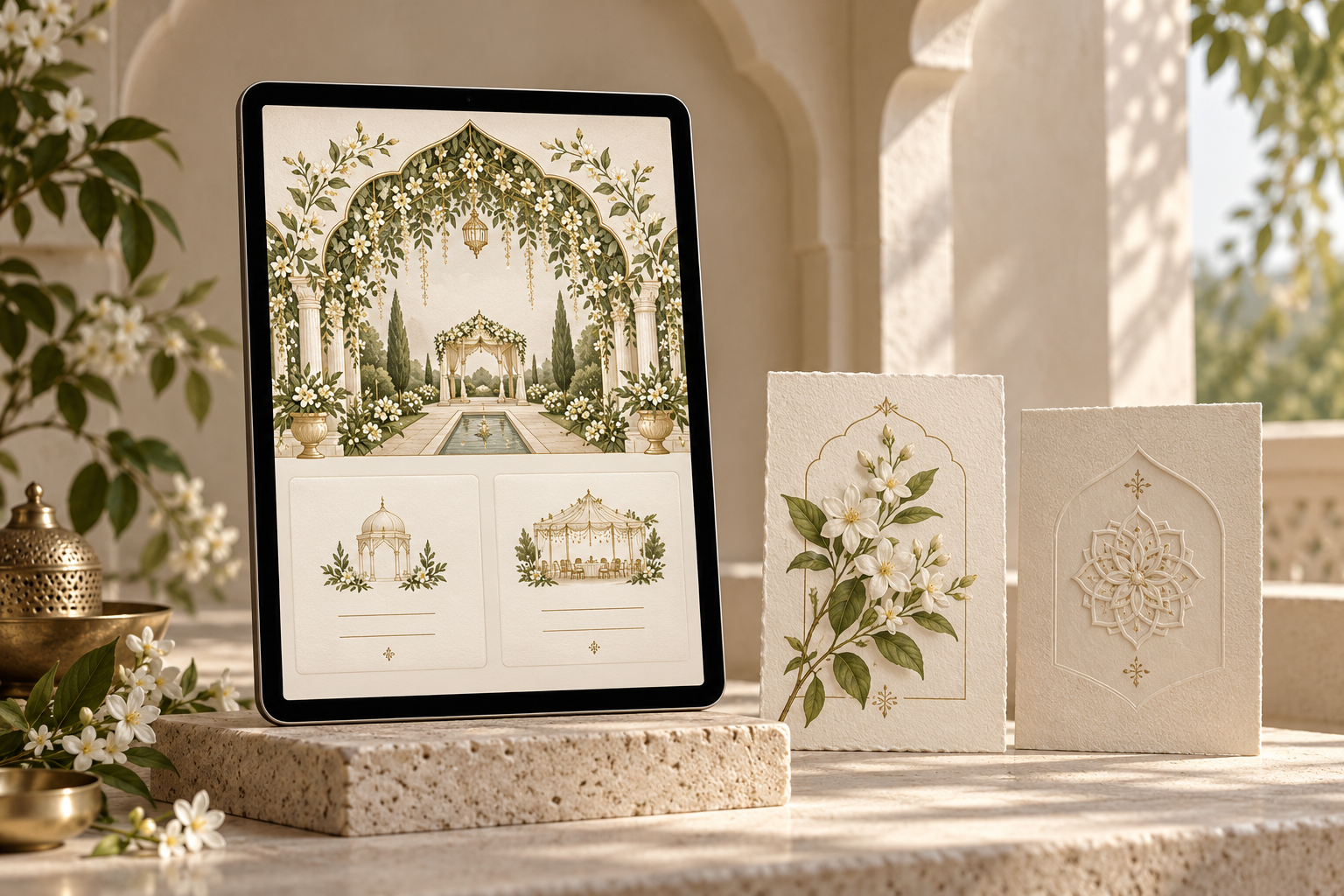
Can you have a wedding website without couple photos?
Yes. A wedding website without couple photos can feel warm and personal through the couple’s names, family wording, colour, artwork and thoughtful event details. For a Nikah or Walima invitation, choose a layout that works without a portrait gallery from the beginning, then give guests a clear route to the schedule, venue and reply instructions.
You may not have a pre-wedding shoot, may prefer to keep portraits within the family, or may simply like an illustrated invitation. You do not need to explain that choice on the website. The practical question is whether the design still feels complete and helps guests understand their invitation.
This guide covers what to check before choosing a design, three photo-free visual directions and an original page plan you can adapt with your designer.
Check the design’s photo requirements before choosing it
A beautiful opening screen does not tell you whether the rest of a website depends on photographs. Scroll through the complete sample and look for portrait introductions, couple galleries, photo timelines and large image panels further down the page.
For each section, ask:
- Is this photograph required for the design to work?
- Can the section be omitted cleanly, or would changing it need a different layout?
- Does the design already use supplied artwork in this position?
- What image will appear when the invitation link is shared?
Noor’s wedding website FAQ explains that supported photo placements can be personalised according to the selected design. That does not establish that every section can be removed or that every design is equally suited to a photo-free brief. Ask the team to confirm which layout will feel complete without couple photographs, and review the entire sample before choosing it.
The Crimson Courtyard design page describes an illustrated invitation with family introductions and event cards. It is a useful starting point for seeing how artwork can carry the visual mood. Noor’s Collection designs retain their original layouts; confirm the scope of any custom artwork or layout changes before ordering.
Decide what “no photos” means for your invitation
A short, precise brief prevents an avoidable misunderstanding. These are different requests:
- No couple portraits: You may still be happy to use an approved venue image, flowers or a photograph of stationery
- No personal photographs: Keep family members and private moments off the website, while using supplied artwork or suitable decorative imagery
- No photographs anywhere on the website: Build the visual direction around illustration, typography, pattern and colour
If you would also prefer no illustrated people or avatars, say so. An illustration of a couple may still feel too personal, even when it is not based on a photograph.
Agree on this with everyone approving the invitation before sending assets, so no one supplies portraits later by mistake.
Three visual directions that work without portraits
Use these creative directions to describe the feeling you want.
1. An artwork-led invitation
Use a floral composition, courtyard scene or architectural frame to establish the atmosphere. Keep the names and event information separate from busy decoration, with enough space to read comfortably on a phone.
A consistent illustration can connect the opening, event headings and closing without repeating a full-screen scene at every step. Ask to see how the artwork crops on a narrow screen: the central arch may survive the crop while the space intended for the names disappears.
If an illustrated palace or garden is decorative, do not label it as the venue. Guests should be able to distinguish the invitation’s visual theme from the actual place they need to reach.
2. Names and typography as the focal point
The couple’s approved names can provide the personality that a portrait might otherwise supply. Pair a decorative name treatment with simpler lettering for the date, time and address.
A monogram can be a supporting detail, but full names still need a clear place. Initials alone may not help an extended-family guest recognise whose celebration this is. Check long names and family titles before approving the composition, rather than shrinking them late in the process.
Have Arabic, Urdu or other wording checked by someone fluent in the language, then approved by the couple and their chosen reviewers. Do not treat an unfamiliar script as a decorative substitute for meaningful, correctly written text.
3. A coordinated botanical or geometric theme
Choose one motif and repeat it sparingly: a jasmine sprig, a floral border or an original geometric pattern. Let colour, paper-like textures and spacing create a sense of occasion.
This direction works best when the decorative elements have a clear role. A border can frame a section; an ornament can separate two events. Adding several unrelated motifs to compensate for the absence of photographs can make the page harder to follow.
For a commissioned design, send a short description of the feeling you want and any approved visual references. Ask the designer to confirm what artwork will be created or supplied and what changes are included in the agreed scope.
An original photo-free page plan for Nikah and Walima
The following is an illustrative content plan, not an actual customer invitation or a guarantee of a particular template’s structure. Use it to review what your chosen design needs to communicate. Replace all bracketed details with approved information.
Opening: name the celebration
“Together with our families, we invite you to celebrate the wedding of [Name] and [Name].”
Place the couple’s names, a clear occasion label and the relevant date or dates near the opening. A short family welcome is enough. There is no need to add a long relationship story just because the website has no photographs.
Event section: let each invitation stand on its own
Nikah
[Day, written date and year] Please arrive at [time and AM/PM] Ceremony begins at [time, if different] [Venue name, full address and city] Directions: [checked map link]
Walima
[Day, written date and year] Reception begins at [time and AM/PM] [Venue name, full address and city] Directions: [checked map link]
Include both events only where the invitation is intended for guests invited to both. If the guest lists differ, agree how the appropriate details will be shared with each group. Do not assume that placing two event cards on a page makes their audiences clear.
Use readable headings and matching information order, so a guest can compare the date, time and venue without interpreting decorative symbols. Put confirmed arrival instructions next to the relevant event.
Guest information: answer the practical questions
Keep this section focused on arrangements that are actually confirmed. It might include the correct entrance, a parking or drop-off note, an accommodation contact or a way to ask about access needs.
Do not add dress, seating, footwear or prayer-space instructions based on a generic wedding checklist. Include them only when they apply to your celebration and the hosts have approved the wording.
Response section: make the next step obvious
“Please let us know by [date] whether you can join us. Use [the agreed response method]. For help replying, contact [approved contact route].”
If the response method is an on-page form, test it in the finished invitation and check that guests can tell when their response has been received. If guests may attend one event but not the other, make sure the agreed reply process can capture that distinction.
Closing: finish with a warm line
“We look forward to welcoming you and celebrating together.”
A brief closing with a restrained ornament is sufficient. You do not need an empty gallery, a “photos coming soon” label or a stock photograph of an unrelated couple to make the page feel finished.
Keep the details readable outside the artwork
An illustrated invitation still needs usable text. Names, dates, addresses and reply instructions should not exist only inside a decorative image that becomes tiny on a phone.
The W3C image guidance recommends avoiding ordinary text embedded in images and choosing text alternatives according to an image’s purpose. For a wedding website, the practical takeaway is to keep essential details as page text and ask the designer to distinguish purely decorative artwork from images that communicate useful information.
For example, a floral border does not need to carry an instruction. A photograph showing a particular entrance does communicate information, so guests also need a clear written explanation. Test the page with larger text and check whether the decoration interferes with reading the details.
A photo-free design is not automatically faster or more accessible. Large artwork and animation still need a real phone test. Judge the finished invitation rather than assuming that removing portraits resolves every usability issue.
Check privacy and sharing separately
Leaving portraits off the website does not make the invitation private. Names, family details, venues and contact information may still be visible to anyone who can open the link, depending on the actual setup.
Review the information you are comfortable sharing, ask how access works for the chosen service and check the link-preview image before sending. Do not assume password protection, restricted event visibility or search-engine exclusions unless those controls have been confirmed for your invitation.
Noor’s invitation privacy guide offers a useful checklist for deciding what belongs on the shared page. Keep private guest information and personal contact details out of decorative screenshots or sample artwork.
Your website photo choice is also separate from your wishes for the celebration itself. If the hosts want guests to avoid posting photographs, communicate that request explicitly through the appropriate guest information or a direct message. Guests cannot infer it from a portrait-free website.
A brief to send your invitation designer
Adapt this example to your actual preference:
“We would like an artwork-led wedding website without couple or family photographs. Please help us choose a design that feels complete without a portrait gallery. We prefer [artwork direction] and want our approved names and family wording to be the personal focus. Please keep the Nikah and Walima details easy to find, and show us the full phone preview and sharing image. Before we confirm, let us know whether any requested layout or artwork change falls outside the selected package.”
If you want no photographs of any kind on the website, replace the first sentence with that exact requirement. If you are open to a venue image, say which image you have permission to use and whether it shows the actual booked location.
Final review before sharing
- Read the full invitation from the opening to the closing on a phone
- Check that no portrait placeholders, empty gallery headings or sample couple photographs remain
- Confirm every name and family line with the agreed reviewers
- Make sure the event details are readable without zooming into an illustration
- Verify that decorative architecture cannot be mistaken for the real venue
- Open the map links and check their destinations
- Test the response method and any alternative contact route
- Review the image and wording shown in the link preview
- Confirm that the invitation includes only the events intended for its recipients
- Check that all supplied images and artwork are approved for this use
A successful photo-free invitation feels deliberate. Its visual style welcomes the guest, and its wording makes the next steps easy to understand.
Frequently asked questions
Do we need a pre-wedding photoshoot for a wedding website?
No. You can choose an artwork-led design and make the invitation personal through names, family wording and the celebration details. Check the template’s requirements first, because some layouts depend on a couple-photo gallery.
Which Noor designs should we explore if we do not want couple photos?
Crimson Courtyard is one starting point for a discussion because its design page highlights a courtyard scene, family details and illustrated event cards. Ask the team to confirm a complete photo-free version of the design you prefer, including any gallery, opening screen and sharing image, before ordering.
Can we remove the gallery from a design we already like?
Ask before committing. A gallery may be part of the chosen layout, and removing or replacing it can affect the structure or scope. Confirm whether removal is supported and what the agreed package includes.
Should we use stock couple photos instead?
An unrelated couple’s portraits can confuse guests about who is getting married. Artwork, approved decorative imagery or a names-led design usually communicates the intention more clearly. Check the permissions for any image you supply; finding it online does not establish permission to use it.
Can we add our photographs later?
That depends on the design’s supported placements and the agreed editing scope. Ask what would change, whether a different layout is needed and whether there is an additional charge. Choose a version that is complete at launch rather than leaving an unfinished section for a possible future update.
Explore Noor’s four wedding website samples.
Open each live sample, compare the experience and ask us which design fits your celebration.
Two more useful reads.
 01
01Your Muslim wedding website checklist
The names, timings, family details, venue information and photographs to gather before making your Muslim wedding website.
Read the guide → 02
02Thoughtful wording for Nikah and Walima invitations
Practical Muslim wedding invitation wording for family introductions, Nikah details, Walima invitations and a warm guest welcome.
Read the guide →