Wedding Invitation Videos Without Photos: Nikah and Walima Ideas
Create a personal Nikah or Walima invitation video without couple photographs. Explore four illustrated and typographic directions, a sample storyboard and a clear designer brief.
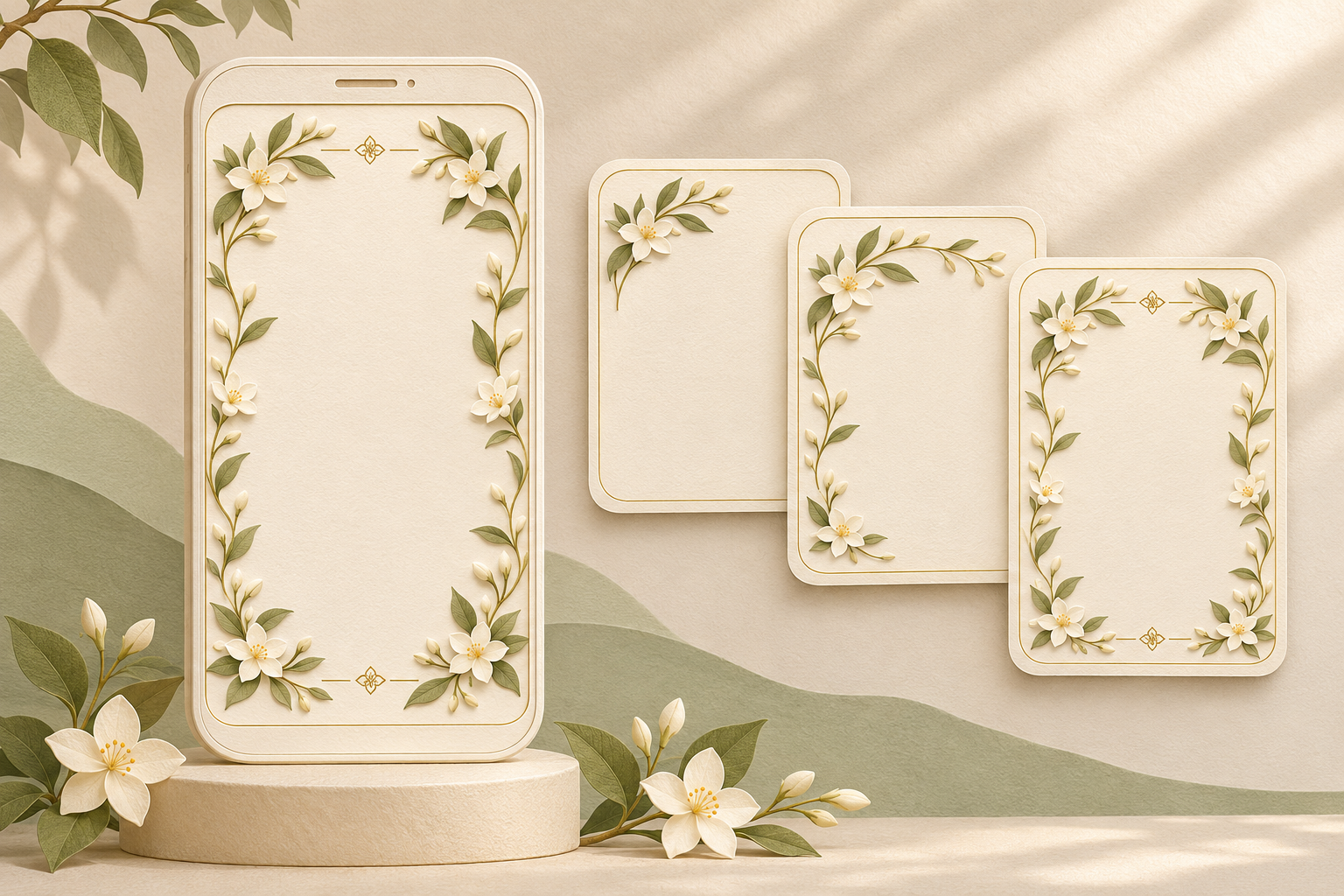
A wedding invitation video can feel personal without showing the couple’s photographs. Names, a thoughtfully chosen motif, expressive lettering and a consistent sequence of animated details can give the film its identity. For a Nikah or Walima invitation, the strongest photo-free approach is to design around those elements from the beginning, rather than remove portraits from a layout that depends on them.
Start with one visual idea you both like. Then decide how it will move, how it will frame your event details and what will connect the scenes. The following directions are creative suggestions to discuss with a designer. Their availability will depend on the chosen template and the scope of any custom work.
What makes a photo-free invitation feel personal?
Personalisation can come from a place, a colour, a family-approved phrase or a small shared interest. You might choose illustrated jasmine because it will appear in your wedding décor, a courtyard inspired by a favourite architectural setting, or a simple monogram you can also use on printed stationery.
Choose meaningful details that do not require guests to understand a private story. One flower and one accent colour can establish a clear direction.
For this guide, “photo-free” means an invitation built from typography, illustration, patterns and graphic animation, without photographic images. You can keep portraits out while still sharing names and event information. Remember that a photo-free invitation is not automatically private: send it only to the intended guests and review any addresses or contact details it contains.
Four visual directions for a Nikah or Walima video
1. An illustrated garden that grows through the film
Use a botanical illustration as a changing frame. A branch might extend along one edge, a few petals settle around the names, and the same leaves form a border around the event information. The movement has a purpose: it connects the different parts of the invitation.
For a soft treatment, try ivory, muted green and a single floral accent. For a richer evening mood, consider a dark background with restrained warm highlights. These are visual choices, not rules about which colours belong to a Nikah or Walima.
Ask the designer to keep the foliage away from letters and numbers. Small decorative elements can become distracting when they pass behind a date or venue name. A still border with a little movement at the edges is often enough.
2. A paper invitation unfolding in motion
Build the video around illustrated paper layers, an envelope or a folded card. A digital flap opens, a textured panel slides into place, and a fine border carries through to the next scene. A monogram can appear on an illustrated seal without needing a portrait panel.
Coordinating the artwork and colours can link this video to any printed wedding stationery.
Keep the number of folds and layers manageable. If every piece has a different movement, the animation can feel like a product demonstration. Ask for one repeated transition and a consistent paper treatment instead.
3. An architectural illustration with gentle depth
An arch, courtyard, window or geometric screen can give the invitation a sense of place. The design might move past a foreground border toward a flat illustrated courtyard, then use the same architectural lines to organise the event details.
Decide whether the artwork represents a real location or an imagined setting. If it is fictional, avoid labelling it as the venue or presenting it like a venue preview. Guests should not mistake a decorative building for the place they need to visit.
When referencing religious or cultural architecture, review the specific imagery with your family. Decorative preferences differ. An arch does not need to carry religious meaning, and a generic mosque illustration should not be treated as a requirement for a Nikah invitation.
4. A name-led film with a restrained monogram
Let the names become the principal visual element. A fine line can trace around an initial, a geometric shape can expand into a frame, or a colour field can shift as the lettering settles into place. This is a useful direction when you prefer a clean design with little illustration.
Keep decorative lettering separate from practical information. A calligraphic name treatment may work beautifully while a straightforward font makes the venue and address easier to check.
If using Arabic or another script, provide the approved wording and ask a fluent reader to review the final rendered version. Check character joining, direction and line breaks. Do not assume that a decorative font or automated text effect will preserve every detail correctly.
Choose a template that works without a portrait
Before choosing a sample, check what happens when its photographs are removed. A large empty portrait frame, a rotating photo strip or a transition built around a face may need redesigning. Replacing every photograph with the same monogram can make the film feel repetitive.
Ask to see the intended replacement for each photo area. Will it become a purpose-built illustration, a text panel or a simpler layout? Confirm whether those changes are supported and included before committing to a design.
The current Noor video invitation service describes portrait films with supported couple photographs. If you want a photo-free version, ask the team whether your chosen design can support it before ordering. Confirm the replacement artwork, any custom animation, the scope and the price. The creative concepts in this guide are suggestions to discuss, not a promise that every design or adaptation is included.
An example storyboard: the illustrated garden
Here is a scene plan using fictional names. It describes the visual progression rather than prescribing a fixed video length.
- Establish the motif. A single jasmine branch appears on an ivory background. Its curved stem becomes a fine border, creating a visual language the later scenes can reuse.
- Introduce the couple. “Sana & Hamza” sits within that border. A few illustrated petals settle into place while the names remain steady. Use the couple’s approved spelling and preferred order.
- Present the Nikah details. The border moves to one side, leaving a clean area for the event label, date, time and venue. Keep the decorative movement outside that information area.
- Present the Walima details, if included. Repeat the same composition with a slightly different accent colour and a clearly labelled event. Preserve the connection between the scenes without relying on colour alone to distinguish the occasions.
- Resolve the visual motif. The branch returns to its earlier shape around a short, approved invitation message. The completed illustration gives the sequence a sense of continuity.
If you are still deciding how to organise separate guest lists or events, first consider whether your Nikah and Walima need one invitation video or two. That decision affects which details belong in this storyboard.
A designer brief you can adapt
Use this as a starting point, replacing the examples with your own choices:
- Format: A photo-free wedding invitation video using illustration and typography. No couple portraits or photographic backgrounds.
- Visual direction: An illustrated jasmine garden with an ivory background, muted green foliage and one warm accent colour.
- Personal detail: A simple monogram using our approved initials. Please show us the proposed treatment before applying it throughout.
- Motion: Gentle growth and small position changes. Keep decoration clear of event details and reuse one transition style.
- Content: Our approved names, hosting line, event labels, dates, times, venues and invitation wording, supplied in a separate text document.
- Cultural review: Include only the symbols and wording we approve. Any additional script must be checked in the rendered proof.
- Delivery: Confirm the required aspect ratio, file format and intended sharing method before production.
- Scope: Identify which changes fit the selected template and which would require separate custom work.
Explain what you like about each reference, such as its botanical border or paper texture. Request an original interpretation.
Mistakes that weaken a photo-free design
Leaving obvious photo placeholders. Removing a picture is only the first step. Review the composition so every remaining frame has a reason to exist.
Adding decoration to fill every space. Empty space helps the names and event information stand out. It does not need to be filled with particles, flowers or extra text.
Mixing unrelated visual styles. A hand-drawn garden, glossy three-dimensional seal and neon monogram can pull the invitation in different directions. Choose a primary style and keep supporting elements consistent.
Animating important wording into fragments. Letter-by-letter effects can distort names or scripts. Prefer a treatment that preserves the approved text, and review the exported video rather than only the design file.
Using assets without checking permission. Confirm that the illustrations, fonts and other supplied assets may be used in the finished invitation. Finding an image online does not establish permission to reuse it.
Before you approve the final video
- Confirm that every portrait-dependent area has been intentionally redesigned.
- Check the spelling, sequence and script rendering of all names.
- Match each event label to its correct date, time and venue.
- Review symbols, phrases and imagery with the people responsible for approving them.
- Check that an illustrated setting cannot be mistaken for the actual venue.
- Watch the exported file on the phone you expect to use for sharing.
- Check that animation does not cover or distort essential information.
- Confirm that the finished file matches the agreed format and contains no unapproved personal details.
- Check any reply instructions, and send a usable link in the accompanying message if guests need one.
Frequently asked questions
Can a wedding invitation video look complete without photographs?
Yes. A consistent combination of names, illustration, colour and movement can carry the design. Choose a layout made for those elements, or confirm how a photo-based template will be redesigned.
What can replace couple photos in a Nikah invitation video?
Options include a botanical illustration, a monogram, an architectural drawing, patterned borders or a paper-inspired composition. Choose one main direction instead of using a different replacement in every scene.
Does a photo-free Nikah video need religious imagery?
There is no need to assume a particular visual treatment. Discuss wording and imagery with your family and any relevant adviser. A typographic or floral design can communicate the event without adding symbols you have not chosen.
Can the Nikah and Walima share the same photo-free design?
They can share a motif, palette and lettering style while using distinct event labels and details. Whether they belong in the same film depends on the guest lists and invitation plan, not on whether photographs are used.
What should we send the designer if we have no photos?
Send approved wording, complete event details, your preferred visual direction and any authorised artwork or monogram. State clearly that the invitation must be photo-free, and confirm the proposed replacements before production begins.
Explore Noor’s four wedding website samples.
Open each live sample, compare the experience and ask us which design fits your celebration.
Two more useful reads.
 01
Your Muslim wedding website checklist
The names, timings, family details, venue information and photographs to gather before making your Muslim wedding website.
Read the guide → 02
Thoughtful wording for Nikah and Walima invitations
Practical Muslim wedding invitation wording for family introductions, Nikah details, Walima invitations and a warm guest welcome.
Read the guide →